

Animated portfolio website template (Downloadable)
If you want to take your portfolio website to the next level, then you can add animation to it. Most clients make judgments after seeing the design of your site. And the animation enhances the design experience of your website.
Share on
However, we should not animate the web pages randomly and make them crazy with lots of unwanted animation that is against the user experience.
So the animation should be minimal, professional, user-friendly & meaningful. If this is what you’re agreeing with then let’s get started.
Before we deep dive, see the animated portfolio template that you’re going to build.
See the live preview →
Did you like the demo? Let’s get started.
Setup Guide (Make it yours)
Clone the template from your terminal:
git clone https://github.com/shihabiiuc/animated-portfolio.gitNavigate to the downloaded/cloned project folder:
cd animated-portfolioOpen the folder in your code editor
If you’re using VS Code, use following command:
code .If you’re using something else, drag and drop the folder to your text editor.
Make necessary edits, change pictures, texts, your portfolio items, etc.
Push Your Progress to a Git Repository
Once you’re satisfied with your progress, push it to a git repository like GitHub. Before pushing, change the remote URL.
- First create a new git repository and copy the URL.
- Replace/Change my repo URL with yours using the following command:
git remote set-url origin your_repository_url_goes_here- Add everything you changed
git add -A- Make a commit
git commit -m "My first commit"- Finally push everything to the remote repository
git push origin mainIf the above command shows any error, use the following command instead:
git push origin masterThat will push everything to the remote repo. From there your can create GitHub pages. That will give you a custom subdomain that you can share to the world.
If you don’t want to use GitHub Pages, there are other JAMstack solution out there vercel, netlify, etc.
None of these will cost you money. But you’ll get super performance, especially for loading speed.
Adding Your Own Domain
You can buy a custom domain name from anywhere and you can add your domain for free to any of the services I mentioned above.
That’s it! Now it’s your turn.
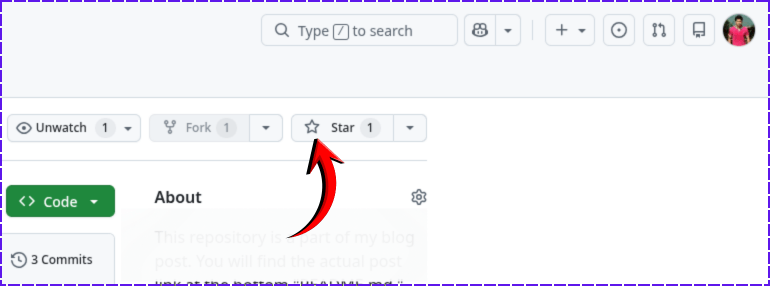
If you found this project helpful, please support me by hitting the 'Star' icon on my GitHub Repository. Please use the following link.
Give it a STAR →
Manual Setup
Go to the following link (my github repo) and download zip.
Go to repository →
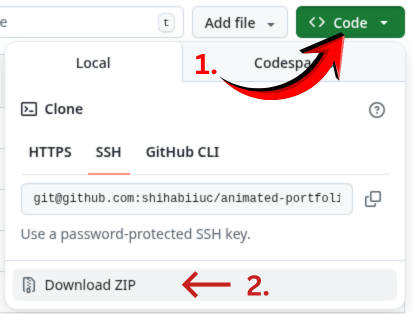
- Click on the “Code” button on the top-right and then “Download ZIP” (as you see in the picture below).
-
After unzip, you will get the project folder named “animated-portfolio-website.”
-
Open it with a your code editor and make edits.
That’s it!
Miscellaneous Talk
I used AOS (animate on scroll). Eventhough it’s very old but still works without any issue and very easy to work with.
If you want to change the type of animation such as fade, fade-up, fade-down, zoom-in, zoom-in-up, etc., please refer to these CSS classes.
Do you need web design help? Feel free to reach out.
I am a freelance web developer helping other developers, designers, and clients. If you need web design-related help, feel free to reach out to me. Always a reasonable price and easy to communicate with.