

How to create a preloader using HTML, CSS, JavaScript?
There are hundreds of ways to create a preloader for your website. But in this post, I will show you how to create a gorgeous preload spinner only using HTML, CSS & a few lines of JavaScript. However, you can also convert/implement this preloader on WordPress websites.
First, let’s see the live preview in the link below.
Preloader live previewIn the live preview/example, the preloader loads for 3 seconds to show you. But on a real website, we want the preloader to disappear after the page finishes loading. And this time is not fixed or static. This DOM loading time is dynamic.
For example, my website may take 7 seconds to load but your website may load in just 1 second.
Whatever the website loading speed is, I will make sure the preloader goes away as soon as the page finishes loading.
Project Structure
preloader/                (root folder)
│
├── index.html
├── style.css
└── script.js
Setup Guide
- Clone the project from my repo to your computer
git clone https://github.com/shihabiiuc/preloader.git- Navigate to the folder
cd preloader- Open the project folder in your code editor. If you’re using VS Code, use the following command in your terminal
code .This will give you a basic html page along with the preloader.
But how can you seperate only the preloader part and implement it on your own website.
Add the following HTML
Just after the opening <body>, add these lines:
<div id="loader-wrapper">
  <div id="loader"></div>
  <div class="loader-section section-left"></div>
  <div class="loader-section section-right"></div>
</div>
Add the following CSS
body {
  background-color: #222222;
  font-family: "Roboto Slab", serif;
  font-weight: 700;
}
section,
footer {
  padding: 90px 15px;
  max-width: 1000px;
  margin: 0 auto;
  text-align: center;
}
h1 {
  color: #ffc600;
  font-size: 30px;
}
p {
  color: rgba(255, 255, 255, 0.6);
  font-size: 16px;
  line-height: 1.7;
}

/* preloader */
#loader-wrapper {
  position: fixed;
  top: 0;
  left: 0;
  width: 100%;
  height: 100%;
  z-index: 9999;
}
#loader {
  display: block;
  position: relative;
  left: 50%;
  top: 50%;
  width: 150px;
  height: 150px;
  margin: -75px 0 0 -75px;
  border-radius: 50%;
  border: 3px solid transparent;
  border-top-color: #3498db;
  -webkit-animation: spin 2s linear infinite; /* Chrome, Opera 15+, Safari 5+ */
  animation: spin 2s linear infinite; /* Chrome, Firefox 16+, IE 10+, Opera */
  z-index: 99999;
}

#loader:before {
  content: "";
  position: absolute;
  top: 5px;
  left: 5px;
  right: 5px;
  bottom: 5px;
  border-radius: 50%;
  border: 3px solid transparent;
  border-top-color: #e74c3c;

  -webkit-animation: spin 3s linear infinite; /* Chrome, Opera 15+, Safari 5+ */
  animation: spin 3s linear infinite; /* Chrome, Firefox 16+, IE 10+, Opera */
}

#loader:after {
  content: "";
  position: absolute;
  top: 15px;
  left: 15px;
  right: 15px;
  bottom: 15px;
  border-radius: 50%;
  border: 3px solid transparent;
  border-top-color: #f9c922;

  -webkit-animation: spin 1.5s linear infinite; /* Chrome, Opera 15+, Safari 5+ */
  animation: spin 1.5s linear infinite; /* Chrome, Firefox 16+, IE 10+, Opera */
}

@-webkit-keyframes spin {
  0% {
    -webkit-transform: rotate(0deg); /* Chrome, Opera 15+, Safari 3.1+ */
    -ms-transform: rotate(0deg); /* IE 9 */
    transform: rotate(0deg); /* Firefox 16+, IE 10+, Opera */
  }
  100% {
    -webkit-transform: rotate(360deg); /* Chrome, Opera 15+, Safari 3.1+ */
    -ms-transform: rotate(360deg); /* IE 9 */
    transform: rotate(360deg); /* Firefox 16+, IE 10+, Opera */
  }
}
@keyframes spin {
  0% {
    -webkit-transform: rotate(0deg); /* Chrome, Opera 15+, Safari 3.1+ */
    -ms-transform: rotate(0deg); /* IE 9 */
    transform: rotate(0deg); /* Firefox 16+, IE 10+, Opera */
  }
  100% {
    -webkit-transform: rotate(360deg); /* Chrome, Opera 15+, Safari 3.1+ */
    -ms-transform: rotate(360deg); /* IE 9 */
    transform: rotate(360deg); /* Firefox 16+, IE 10+, Opera */
  }
}
#loader-wrapper .loader-section {
  position: fixed;
  top: 0;
  width: 51%;
  height: 100%;
  background: #fff;
  z-index: 1000;
  -webkit-transform: translateX(0); /* Chrome, Opera 15+, Safari 3.1+ */
  -ms-transform: translateX(0); /* IE 9 */
  transform: translateX(0); /* Firefox 16+, IE 10+, Opera */
}
#loader-wrapper .loader-section.section-left {
  left: 0;
}
#loader-wrapper .loader-section.section-right {
  right: 0;
}

/* Loaded */
.loaded #loader-wrapper .loader-section.section-left {
  -webkit-transform: translateX(-100%); /* Chrome, Opera 15+, Safari 3.1+ */
  -ms-transform: translateX(-100%); /* IE 9 */
  transform: translateX(-100%); /* Firefox 16+, IE 10+, Opera */

  -webkit-transition: all 0.7s 0.3s cubic-bezier(0.645, 0.045, 0.355, 1);
  -o-transition: all 0.7s 0.3s cubic-bezier(0.645, 0.045, 0.355, 1);
  transition: all 0.7s 0.3s cubic-bezier(0.645, 0.045, 0.355, 1);
}

.loaded #loader-wrapper .loader-section.section-right {
  -webkit-transform: translateX(100%); /* Chrome, Opera 15+, Safari 3.1+ */
  -ms-transform: translateX(100%); /* IE 9 */
  transform: translateX(100%); /* Firefox 16+, IE 10+, Opera */

  -webkit-transition: all 0.7s 0.3s cubic-bezier(0.645, 0.045, 0.355, 1);
  -o-transition: all 0.7s 0.3s cubic-bezier(0.645, 0.045, 0.355, 1);
  transition: all 0.7s 0.3s cubic-bezier(0.645, 0.045, 0.355, 1);
}
.loaded #loader {
  opacity: 0;
  -webkit-transition: all 0.3s ease-out;
  -o-transition: all 0.3s ease-out;
  transition: all 0.3s ease-out;
}
.loaded #loader-wrapper {
  visibility: hidden;

  -webkit-transform: translateY(-100%); /* Chrome, Opera 15+, Safari 3.1+ */
  -ms-transform: translateY(-100%); /* IE 9 */
  transform: translateY(-100%); /* Firefox 16+, IE 10+, Opera */

  -webkit-transition: all 0.3s 1s ease-out;
  -o-transition: all 0.3s 1s ease-out;
  transition: all 0.3s 1s ease-out;
}
Add the following JavaScript
document.addEventListener("DOMContentLoaded", function () {
  setTimeout(function () {
    document.querySelector("body").classList.add("loaded");
  }, 10);
});
That’s it! You just added a dynamic preloader on your website.
Do you want to get this preloader as a WordPress plugin?
I gave you all the code (HTML, CSS & JavaScript) for this preloader. And you can implement it for free (on any number of static websites).
But if you want this preloader as a WordPress plugin, you can buy it only for a small price. Lifetime updates & support are included even if the price goes up in the future.
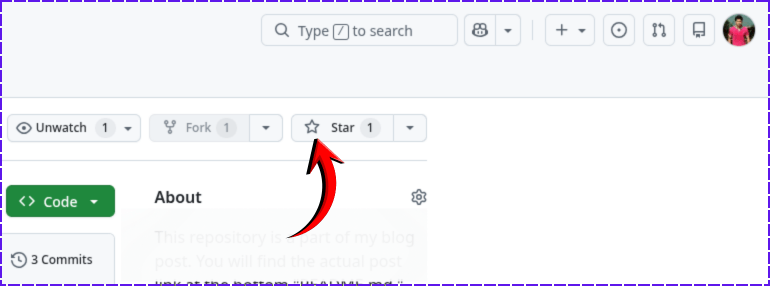
Contact Me »If you found this project helpful, please support me by hitting the 'Star' icon on my GitHub Repository. Please use the following link.
Do you need web design help? Feel free to reach out.
I am a freelance web developer helping other developers, designers, and clients. If you need web design-related help, feel free to reach out to me. Always a reasonable price and easy to communicate with.