

Download HTML CSS Resume Template
Create a resume or CV (curriculum vitae) using HTML & CSS. Quickly get started by downloading it and make necessary edits. If you get stuck, feel free to reach out for paid help. The template I built for this post is completely mobile responsive.
Live Demo
Setup Guide
If you’re new to this field and not yet familiar with the terminal or Git, I recommend using the 'Newbie Setup Guide' below or search for 'Newbie Setup Guide'
- First of all, clone (download) the template from your terminal using the following command:
git clone https://github.com/shihabiiuc/resume.git- Second, navigate to the project folder by
cd resume- Third, open the project folder
code .This will open the prorject folder in VS Code. But if you’re using something different than it such as Sublime, Atom, etc. Manually open the folder in your desired code editor.
And most importantly, edit the template files such as your name, designation, picture, contact details, education, experience, and references.
Onec you’re happy with the changes, push it to the live server. Don’t worry! It won’t cost you money.
There are different types of JAMstact servers such as Netlify, Vercel, Cloudflare Pages, etc. If you’re unsure, let’s go with Netlify.
-
In the fourth step, you have to create a git repository. There are various git hosting services such Bitbucket, GitLab, GitHub. I highly recommend you use GitHub (I am not saying others are bad but it’s most easier to use and you can create private repos without any cost and very reliable.)
-
Fifth, you have to replae the remote origin path. Because when you cloned template, it automatically adds my repository path. For example if check
git remote -vThis will show you my repository path:
origin https://github.com/shihabiiuc/resume.git (fetch)
origin https://github.com/shihabiiuc/resume.git (push)
which you don’t what. Instead create your own repository on GitHub and replace my paths with your. Let’s say- your repository path is:
git@github.com:shihabiiuc/john.git
To replace the old path with yours, use the following command in your terminal:
git remote set-url origin git@github.com:shihabiiuc/john.gitAfter that you can confirm or recheck if the path has been successfully changed by running the same command
git removte -vIf that shows your git remote origin url, you’re good to go.
- Sixth, you’re very closed to it and now we are a few minutes away. So be patient.
Now, add the following three commands in your terminal one by one:
git add -Agit commit -m "Updated my Resume"git push origin masterWait a minute and it will push everything to your GitHub Repository.
But if the above command shows an error e.g.
error: src refspec main does not match any
error: failed to push some refs to 'github.com:shihabiiuc/john.git'
Then use this modern command instead
git push origin mainThese two do the same thing but the “master” is gradually going to legacy, hopefully in the next 2/3 years.
Anyways, now you’re done pushing your Resume/CV files, folders, and everything in your own Git Repository (GitHub).
- Now, it’s the fun part: Showing your Resume to the world and get a shareable link.
Go to Netlify.com and create a free account.
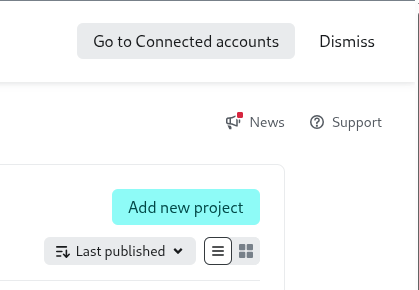
Create a new project here. You will find the button most probably in the top-right corner.
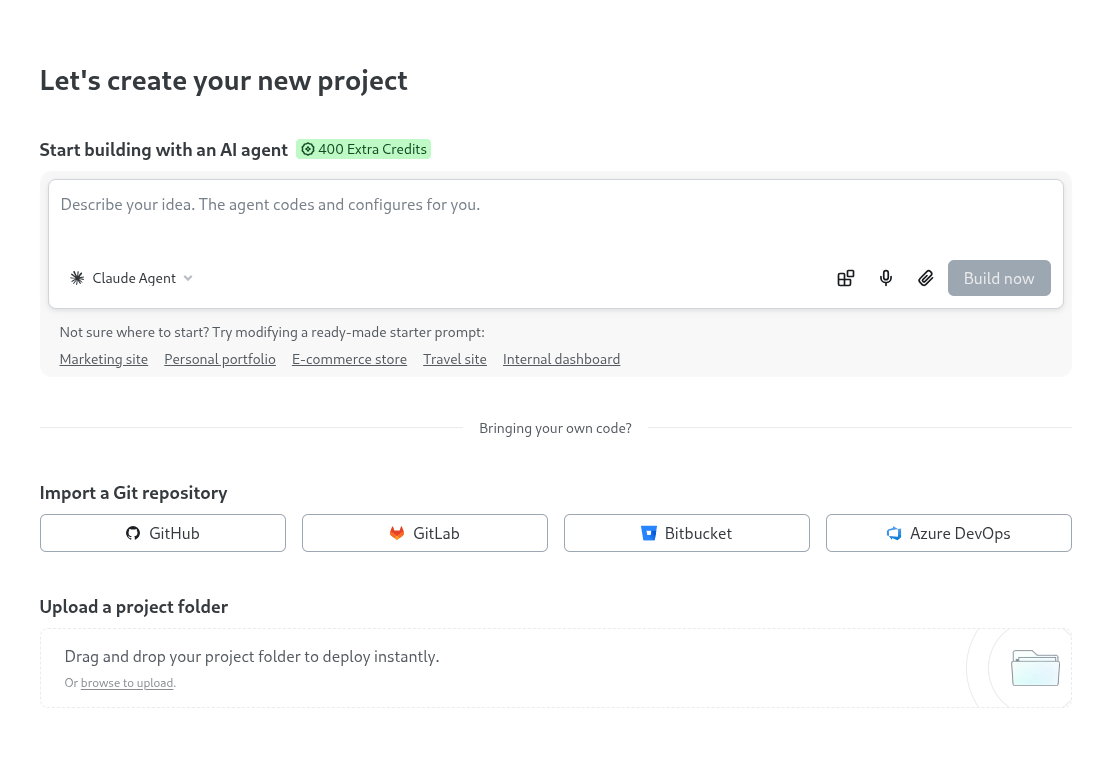
In the next window, you’ll find an option to import the project from your GitHub repository.
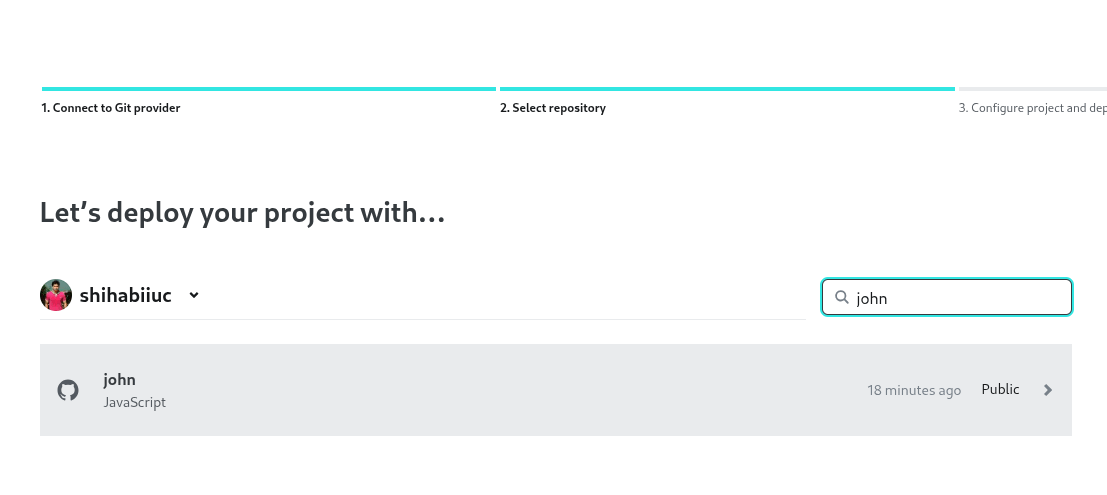
In the next window authenticate and show the repository that you want to connect to Netlify (if you have multiple).
Give it a “Project Name” (without space), this will be a part of the domain (subdomain). In my case, I named it “hollycow.”
For the rest of the fields, leave them as they are and hit the “Deploy” button at the very bottom.
This might take 15 seconds and boom! Your resume website is now published and everyone can see it.
That’s all!
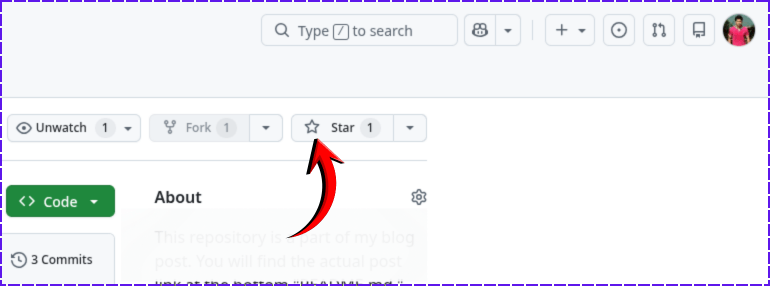
If you found this project helpful, please support me by hitting the 'Star' icon on my GitHub Repository. Please use the following link.
Give it a STAR
Since I chose “hollycow” as my project name, so my CV can be found at https://hollycow.netlify.app/
Your’r would be different.
Do you need web design help? Feel free to reach out.
I am a freelance web developer helping other developers, designers, and clients. If you need web design-related help, feel free to reach out to me. Always a reasonable price and easy to communicate with.
Newbie Setup Guide
If you're a manual person and not familiar with a terminal, please copy and paste the code from below and read as much as you can (so you can understand/learn the core process), build your resume yourself, and show it to the world.
HTML
<!DOCTYPE html>
<html lang="en">
  <head>
    <meta charset="UTF-8" />
    <meta name="viewport" content="width=device-width, initial-scale=1.0" />
    <link rel="shortcut icon" href="favicon.png" />
    <!-- google font -->
    <link rel="preconnect" href="https://fonts.googleapis.com" />
    <link rel="preconnect" href="https://fonts.gstatic.com" crossorigin />
    <link
      href="https://fonts.googleapis.com/css2?family=Lato:wght@400;700;900&display=swap"
      rel="stylesheet"
    />
    <!-- google font ends here -->
    <!-- font awesome 6.4.2 -->
    <script
      src="https://kit.fontawesome.com/367f8e95b8.js"
      crossorigin="anonymous"
    ></script>
    <!-- font awesome ends here -->
    <link rel="stylesheet" href="style.css" />
    <title>Your Name - Resume/CV</title>
  </head>
  <body>
    <section class="resume-container">
      <div class="left-sidebar">
        <img src="./img/headshot.jpg" alt="headshot" />
        <h3 class="heading">Contact me</h3>
        <address class="contact">
          <i class="fa-solid fa-square-phone"></i> +123-456-7890
        </address>
        <address class="contact">
          <i class="fa-solid fa-square-envelope"></i> username@provider.com
        </address>
        <p class="contact">
          <i class="fa-solid fa-square-arrow-up-right"></i> www.yoursite.com
        </p>
        <address class="contact">
          <i class="fa-solid fa-map"></i> 123 Anywhere St., Your City, State
          12345
        </address>
        <h3 class="heading">Education</h3>
        <p class="course">Course Studied University/College Details</p>
        <p class="timeline">2008 - 2010</p>
        <p class="course">Course Studied University/College Details</p>
        <p class="timeline">2011 - 2014</p>
        <p class="course">Course Studied University/College Details</p>
        <p class="timeline">2015 - 2016</p>
        <h3 class="heading">Skills</h3>
        <ul class="skills">
          <li>UI/UX Design</li>
          <li>JavaScript</li>
          <li>NodeJS</li>
          <li>Wireframes</li>
          <li>SEO</li>
          <li>Web Design</li>
          <li>WordPress</li>
        </ul>
      </div>
      <!-- left-sidebar -->
      <main class="main-body">
        <h1><span class="w900">John</span><br />Martinez</h1>
        <p class="designation">Software Engineer</p>
        <h2 class="secondary">
          <i class="fa-solid fa-poo-storm"></i> Work experience
        </h2>
        <div class="job-info">
          <p>Job position here</p>
          <time>2019 - 2023</time>
        </div>
        <h3>Company Name | Location</h3>
        <p class="job-detail">
          Lorem ipsum dolor sit amet consectetur adipisicing elit. Temporibus
          natus a incidunt est dolore eum, obcaecati voluptas tenetur qui
          similique blanditiis sit, nobis culpa perspiciatis vero, autem
          accusantium ab consectetur nihil! Repudiandae consequuntur aspernatur
          deserunt quaerat perspiciatis blanditiis eius debitis a officiis. Enim
          velit minima porro! Consequuntur ut itaque magni.
        </p>
        <div class="job-info">
          <p>Job position here</p>
          <time>2019 - 2023</time>
        </div>
        <h3>Company Name | Location</h3>
        <p class="job-detail">
          Lorem ipsum dolor sit amet consectetur adipisicing elit. Temporibus
          natus a incidunt est dolore eum, obcaecati voluptas tenetur qui
          similique blanditiis sit, nobis culpa perspiciatis vero, autem
          accusantium ab consectetur nihil! Repudiandae consequuntur aspernatur
          deserunt quaerat perspiciatis blanditiis eius debitis a officiis. Enim
          velit minima porro! Consequuntur ut itaque magni.
        </p>
        <div class="job-info">
          <p>Job position here</p>
          <time>2019 - 2023</time>
        </div>
        <h3>Company Name | Location</h3>
        <p class="job-detail">
          Lorem ipsum dolor sit amet consectetur adipisicing elit. Temporibus
          natus a incidunt est dolore eum, obcaecati voluptas tenetur qui
          similique blanditiis sit, nobis culpa perspiciatis vero, autem
          accusantium ab consectetur nihil! Repudiandae consequuntur aspernatur
          deserunt quaerat perspiciatis blanditiis eius debitis a officiis. Enim
          velit minima porro! Consequuntur ut itaque magni.
        </p>
        <div class="job-info">
          <p>Job position here</p>
          <time>2019 - 2023</time>
        </div>
        <h3>Company Name | Location</h3>
        <p class="job-detail">
          Lorem ipsum dolor sit amet consectetur adipisicing elit. Temporibus
          natus a incidunt est dolore eum, obcaecati voluptas tenetur qui
          similique blanditiis sit, nobis culpa perspiciatis vero, autem
          accusantium ab consectetur nihil! Repudiandae consequuntur aspernatur
          deserunt quaerat perspiciatis blanditiis eius debitis a officiis. Enim
          velit minima porro! Consequuntur ut itaque magni.
        </p>

        <h2 class="secondary">
          <i class="fa-solid fa-person-shelter"></i> References
        </h2>
        <div class="ref">
          <div class="col">
            <h3>Jane Smith</h3>
            <p>Duckduco Inc. / CEO</p>
            <p>Phone: +123-456-7890</p>
            <p>Email: jane@duckduco.com</p>
          </div>
          <div class="col">
            <h3>Barak Obama</h3>
            <p>Duckduco Inc. / CEO</p>
            <p>Phone: +123-456-7890</p>
            <p>Email: barak@duckduco.com</p>
          </div>
        </div>
      </main>
      <!-- main-body -->
    </section>
  </body>
</html>
Do you need web design help? Feel free to reach out.
I am a freelance web developer helping other developers, designers, and clients. If you need web design-related help, feel free to reach out to me. Always a reasonable price and easy to communicate with.
*,
*::after,
*::before {
  -webkit-box-sizing: border-box;
  box-sizing: border-box;
}

body {
  padding: 0;
  margin: 0;
  background-color: #193549;
  font-family: "Lato", sans-serif;
  font-weight: 400;
  font-size: 16px;
}

img {
  max-width: 100%;
}

.resume-container {
  background-color: #ffffff;
  max-width: 900px;
  margin: 0 auto;
  display: block;
}
@media (min-width: 768px) {
  .resume-container {
    display: -webkit-box;
    display: -ms-flexbox;
    display: flex;
    -webkit-box-pack: justify;
    -ms-flex-pack: justify;
    justify-content: space-between;
  }
}
.resume-container .left-sidebar {
  -webkit-box-flex: 1;
  -ms-flex: 1;
  flex: 1;
  background-color: #f4f4f4;
  color: #444441;
  padding: 60px 45px;
}
@media (min-width: 768px) {
  .resume-container .left-sidebar {
    margin-right: 45px;
  }
}
.resume-container .left-sidebar img {
  max-width: 200px;
  margin: 0 auto 60px;
  display: block;
  border-radius: 50%;
}
.resume-container .left-sidebar .heading {
  text-transform: uppercase;
  font-weight: 900;
  font-size: 1.4em;
  padding: 10px 5px;
  border-radius: 25px;
  color: #ffffff;
  background-color: #444440;
  text-align: center;
  margin: 40px 0 20px;
}
.resume-container .left-sidebar .contact {
  font-style: normal;
  font-size: 1em;
  line-height: 1.7;
  margin: 0 0 15px;
}
.resume-container .left-sidebar .contact i {
  color: #444441;
}
.resume-container .left-sidebar .course {
  font-size: 1.2em;
  font-weight: 900;
  margin-bottom: 5px;
}
.resume-container .left-sidebar .timeline {
  margin: 0 0 30px;
}
.resume-container .left-sidebar ul.skills {
  padding: 0;
}
.resume-container .left-sidebar ul.skills li {
  line-height: 3;
}
.resume-container .main-body {
  padding: 60px 30px;
  -webkit-box-flex: 2;
  -ms-flex: 2;
  flex: 2;
  color: #4c4d4f;
  background-color: #ffffff;
}
.resume-container .main-body h1 {
  font-size: 3.5em;
  font-weight: 400;
  color: #333132;
  margin: 30px 0 0;
}
.resume-container .main-body h1 .w900 {
  font-weight: 900;
}
.resume-container .main-body .designation {
  margin: 0 0 80px;
  font-size: 1.5em;
  letter-spacing: 2px;
}
.resume-container .main-body h2.secondary {
  text-transform: uppercase;
  color: #322d2e;
  font-size: 1.5em;
  font-weight: 900;
}
.resume-container .main-body h2.secondary i {
  color: #ea4335;
  font-size: 1.7em;
}
.resume-container .main-body .job-info {
  margin-top: 45px;
  display: -webkit-box;
  display: -ms-flexbox;
  display: flex;
  -webkit-box-pack: justify;
  -ms-flex-pack: justify;
  justify-content: space-between;
  -webkit-box-align: center;
  -ms-flex-align: center;
  align-items: center;
  background-color: #e9ebec;
  padding: 4px 7px;
  border: 1px solid #d2d3d4;
  border-radius: 4px;
}
.resume-container .main-body .job-info p {
  font-size: 1.1em;
  color: #4c4d4f;
  margin: 0;
}
.resume-container .main-body h3 {
  color: #3d3d3e;
  font-weight: 900;
}
.resume-container .main-body p.job-detail {
  line-height: 1.7;
  font-size: 1em;
}
.resume-container .main-body .ref {
  background-color: #ea4335;
  display: block;
}
@media (min-width: 768px) {
  .resume-container .main-body .ref {
    display: -webkit-box;
    display: -ms-flexbox;
    display: flex;
    -webkit-box-pack: justify;
    -ms-flex-pack: justify;
    justify-content: space-between;
  }
}
.resume-container .main-body .ref .col {
  background-color: #dee1e6;
  padding: 20px;
  border: 1px solid #ebf0f7;
}
.resume-container .main-body .ref .col p {
  font-size: 0.9em;
} /*# sourceMappingURL=style.css.map */
That’s all.
Download the resume template and edit the information to match your requirements
You can download the entire project folder from my GitHub Repository. It contains everything that you saw in the project structure and even a SCSS file (would be helpful if you know SASS).
Download
Before you download, don’t for get to give it a star (if it deserves)
Why a digital resume is essential?
A digital (online) resume is essential because you can share it with anyone using a link. Most importantly, you can edit & update information anytime you like and without changing the URL.
Your resume is not a document of fixed information. Your skills, educational qualifications, and experience change over time. And you can include those updated information in your online resume very easily.
On the other hand, a printed resume is permanent if you send it to someone. It has different use cases and it’s also important when someone asks for it.
But when you send a printed copy of your resume to an office, you can’t change any of its information. Even if you see that you made a mistake or excluded important info. But on your online resume, you can always change it. And anytime people visit the URL, they will see the most recent and up-to-date information.
Last but not least, you can share your resume link with friends, families, coworkers, and professional networks like LinkedIn, Slack community, etc.